Sentencing Guidelines Calculator - United States

How to use SGC-US to Calculate Sentencing Guidelines

Follow these simple steps to calculate potential sentencing scenarios

Steps to calculate a guideline range using SGC-US

The Sentencing Guidelines Calculator for the United States, by Mokasoft, allows you to save time while determining an accurate sentencing range for federal crimes. Explore difference scenarios and create crystal clear print outs of USSC Worksheets and a Summary Report for you to review with your client, other attorneys, judges, and other professionals. No more scrolling through the PDF and hand writing your calculations.

  • Saves you time

  • Improves your organization

  • Simplifies your process

  • Enhances your preparedness


How it Works

01

Select the statue / guideline

Search by either Statute or Guideline to select to correct Statute/Guideline combination.
02

Enter one or multiple counts of conviction

Using an interactive version of the Guidelines Manual, select the appropriate options for the Offense Conduct. Then, for each Count of Conviction, select applicable adjustments.
03

Group multiple counts of conviction (if applicable)

Group together all Closely Related Counts. We will calculate the Total Units and display the Combined Adjusted Offense Level.
04

Calculate the criminal history category

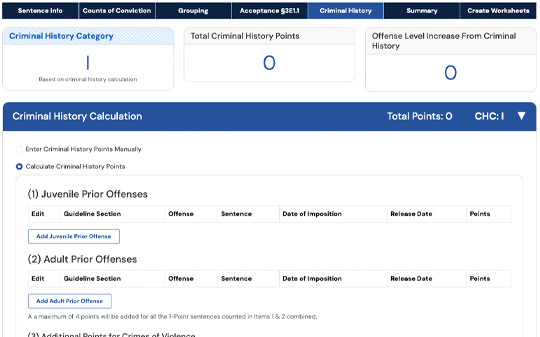
Either manually enter the CHC or let us help you calculate it by entering their prior records. And, select from applicable Criminal Livelihood factors.
05

You're done! Now view the Summary

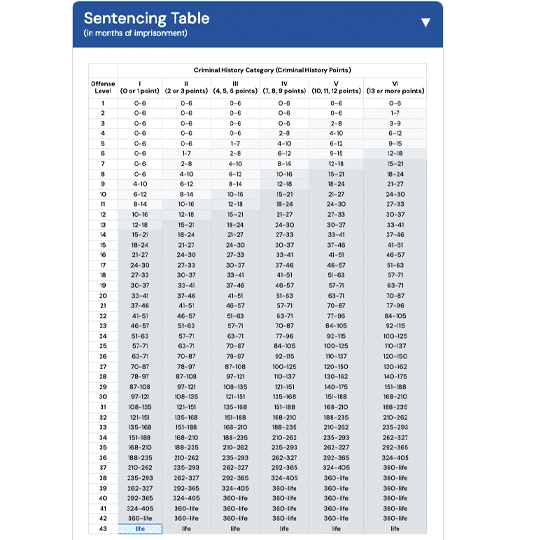
It’s that easy! SGC-US will use the information you entered to calculate and display Final Sentencing Guideline. We will also display a Sentencing Table, highlighted with the calculated range.
06

USSC Worksheets and summary report

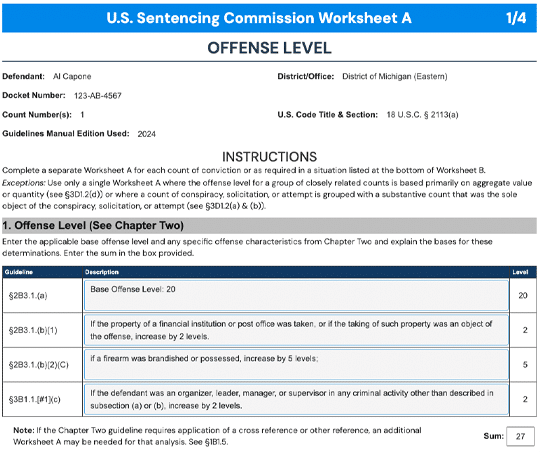
You can also create USSC Worksheets A-D from the information you already entered. Optionally, you can customize the wording on Worksheet A for any option you selected. We will also create an all-encumpacing summary report to display all that you entered, notes that you've written, and the results that we calculated.

No Monthly Subscriptions

The Sentencing Guidelines Calculator for the United States uses a credit system. Only pay for what you and your organization utilize.

Add a Sentence

Click the “New Sentence” button to get started

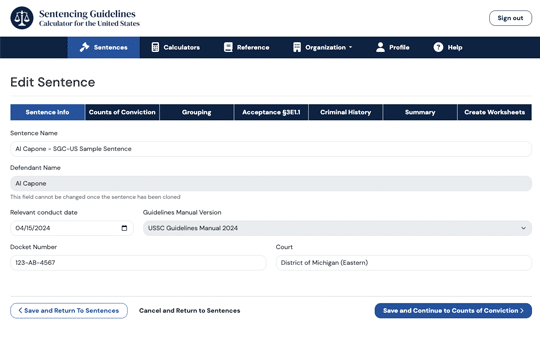
Enter Basic Sentence Information

Defendant name, relevant conduct date, docket number, etc.

Enter the first Count of Conviction

Search by Statute or Guideline

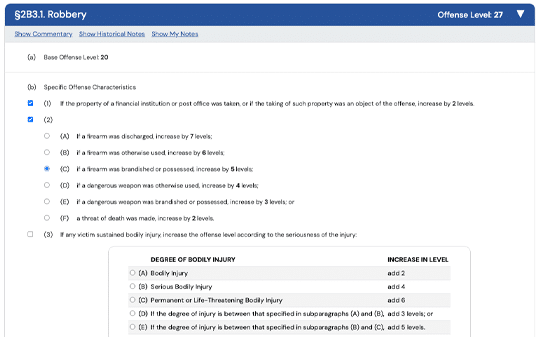
Selecting all relevant Offense Conduct options

Proceed to the Offense Conduct screen to select all relevant conduct from the options displayed as they are in the USSC manual.

Select any Adjustments

Short written steps to add a sentence

Add additional Counts of Conviction and Group them together

Grouping Closely Related Counts is easy

Enter or Calculate Criminal History Category

Simply select a CHC or enter all the relevant information and let us calculate it for you.

View the Results

On a well-organized summary page view the calculated guideline range as well as the Sentencing Table, highlighted. And, a summary of all the information you entered.

Create the USSC Worksheets

With a click of a button, we will fill all the information you entered into the USSC Worksheets A, B, C, and D. Customize the default descriptions as you want. Download or print this professional-looking PDF report.

Start Today for Free

When you sign up for a free trial, we will load your account with a sample sentence, 100% free. There are no monthly charges; once you're ready to use it on a case just purchase your first credit. Credits and Bundles are 50% off your first 30 days!
Sentencing Guidelines Calculator - United States
Simplify the United States sentencing guidelines process.